Overview
Tenancy extracts nine sections from residential lease PDFs and flags fields for review. The reviewer can compare each flagged value with the source document, accept it, save a correction or reject it.
I built the frontend, extraction service and MCP interface as an independent portfolio demo. The current UI puts the review queue beside the PDF on desktop and before it on mobile.
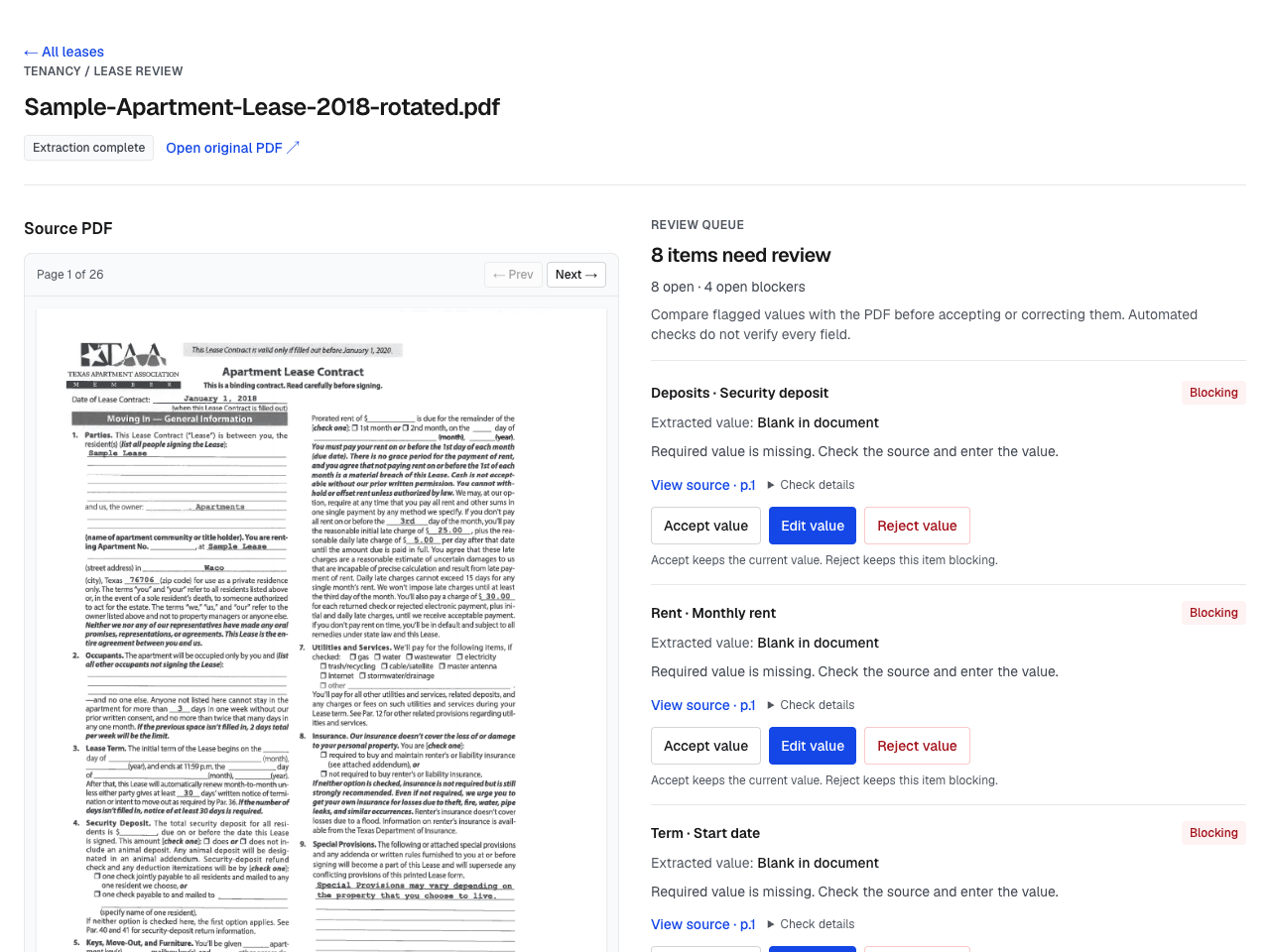
Live app, October 24, 2026. The sample lease has finished extraction and still has eight items to review.
The review problem
A structured value is difficult to check without its source. Early text matching sometimes highlighted the wrong line, while model-generated coordinates drifted around blank fields. I moved highlight positioning to OCR word coordinates and kept the model responsible for extracting values and source snippets.
The UI also needed to distinguish completed extraction from completed review. A blank rent field could previously appear beside a green confidence percentage, while the review queue sat below all nine extracted sections.
The current workflow
The review queue now comes first, with blockers before warnings. Each item shows the extracted value or a missing-value description, a source-page link when available and three actions:
- Accept value keeps the value and clears that review item.
- Edit value saves a correction to the stored extraction.
- Reject value records the decision. Rejected blocking values remain visible and continue to block review.
After a saved decision, the app reloads both the lease fields and review items. If that reload fails, it labels the displayed data as the previous snapshot and pauses further decisions until reload succeeds.
The status badge says Extraction complete separately from the open-review count. Missing fields read Blank in document, Not stated or Not extracted, according to the source information. Short notes appear beside relevant values; full model notes and self-reported certainty remain expandable. Inferred Yes/No values are labeled as model interpretations and show the stored source excerpt. A model can still mistake an unstated right for a prohibition. The averaged confidence score is no longer displayed in the field summary.
Extraction and source links
The service combines OCR text with page images to extract parties, property, term, rent, deposits, utilities, pets, special clauses and disclosures. Page images provide context for checkboxes and handwritten entries that OCR can misread.
The backend matches source snippets to OCR word positions with pdfplumber and RapidFuzz, then returns a highlight box for each matched line. Source references are optional and can be wrong or absent. Field links open the source page and draw an overlay when coordinates are available. Checkbox and signature geometry is not highlighted.
Questions use the stored extraction, without the review queue or its decisions. Review status belongs in the queue. The model is prompted to cite field paths, but can return no citations. Citation links resolve against the stored field’s source page and available highlight coordinates; generated page numbers and snippets do not control navigation. Unknown fields, section references and sources marked absent cannot create links. Citations to corrected fields identify the original source, which may show the previous value. This checks the reference structure, not whether the cited field supports the answer. Saving a review decision clears the displayed answer and pauses questions until the fields reload. The same backend exposes six MCP tools for listing, retrieving and extracting leases, asking questions, and listing or resolving review items.
Source: frontend and backend / MCP.
Verification and limits
The October 24 UI release was checked on the deployed app for queue order, note disclosures, source-page navigation, correction-form cancellation and mobile layout. Existing production lease data was unchanged. Saved corrections and recovery after a failed reload were tested with local fixtures.
A fresh extraction on October 25 used a one-page fictional lease labeled as QA data. Rent and dates matched the fixture, but the model interpreted an unstated early-termination right and subletting permission as “No.” Its Q&A also supplied a page reference for a whole section rather than a source-bearing field. These findings prompted the interpretation labels and source-link checks above; they do not establish extraction accuracy.
Thirteen automated checks cover review state, missing-value labels, formatting, source navigation, citation resolution and refresh behavior. They do not measure extraction accuracy. Highlight placement has been checked manually on sample documents; there is no formal extraction evaluation set.
Extraction and exceptions are saved before human review. The readiness flag summarizes blocking review items; it does not gate the first database write or export to a property-management system. No such external integration is implemented. Validation uses deterministic heuristics, including a fixed deposit-to-rent check, rather than jurisdiction-specific legal rules. Model confidence is self-reported and has not been calibrated against labeled leases.
Multi-tenant authentication and a feedback loop that uses review corrections to improve extraction are not implemented. Automated flags guide review; a person still needs to verify the extracted fields and complete the lease review.